Fund your Bet9ja account using Quickteller’s easy online payment method.
There is a ₦100 + 1.25% up to ₦50 charge for deposits with this payment method.
Step1 Visit https://www.quickteller.com/bet9ja
Step2
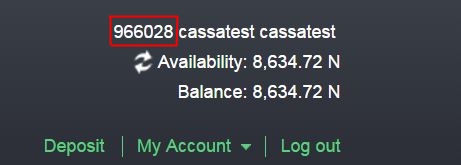
Enter your unique Bet9ja User ID (this can be found at the top right corner of the website when you login. Please note that it is not your username.)
Enter your email address.
Enter your mobile number.
Enter the amount that you would like to deposit in your Bet9ja account.
Step3 The system will then call up your information from the bank end system.
Step4 Verify payment details and click on PAY.
Step5 Payment receipt will be generated and displayed.
Step6 You will receive an email notification to the email address provided.
You can also:
ATM: Select QUICKTELLER from the ATM menu.
MOBILE APPs: Visit get.quickteller.com and download the right app for your phone.
SMS to PAY: Just SMS 'QT HELP' to 32122.
SHORT CODE: Simply dial *322# and follow the prompt.
Comments
Post a Comment